![Group 289.png]](https://support.bldup.com/hs-fs/hubfs/Group%20289.png?height=40&name=Group%20289.png)
Biz Intelligence segments are custom saved searches that send you alerts with any new inflection points. A new project could be created, a new company could be added or the project might move to a new stage.
Step 1: Biz Inteligence tab
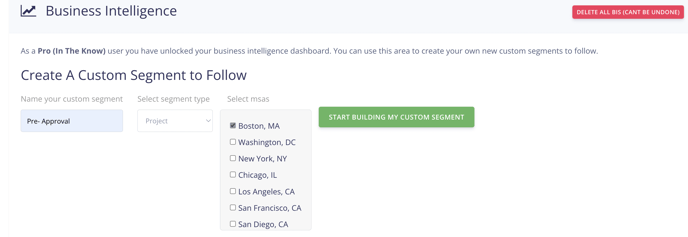
Start by clicking on ‘biz intelligence’. You can create a custom segment. Make sure to name it to organize your alerts.
Step 2: Customize preferences
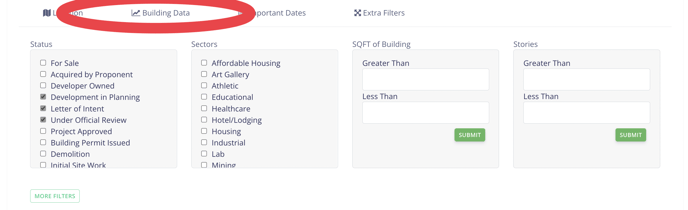
Once you click the green button it will take you to a page to customize the information. Clicking the tab ‘building data’ will let you pick different stages of the project or sectors.
Step 3: View your search
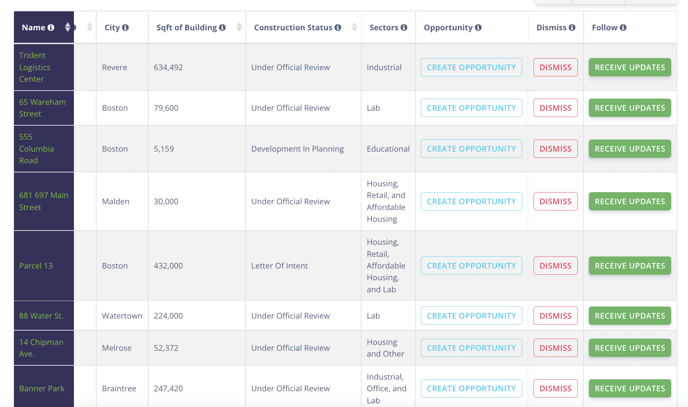
Once you have clicked a few boxes it will create a search for you. This will be a list of all the projects. You can click on the project on the left side. You can also 'create an opportunity' a place to add notes and create workflow, dismiss will take it out of this search. Receive updates will go to your following tab at the top of the page.